
The Life of a PHP Process: From Request to FPM Worker Pool

When You Run PHP, What Actually Runs?
You write a .php file, a request comes in, and a page appears. It feels instant. But behind that single request, an operating system process is born, does its work, and is reset for the next visitor.
Understanding that process is the difference between guessing why your app is slow and knowing exactly where the time goes. This post follows one request from start to finish, then zooms out to the pool of processes that PHP-FPM keeps ready for you.
Let us start with the one idea that explains almost everything about PHP.
The Shared-Nothing Model
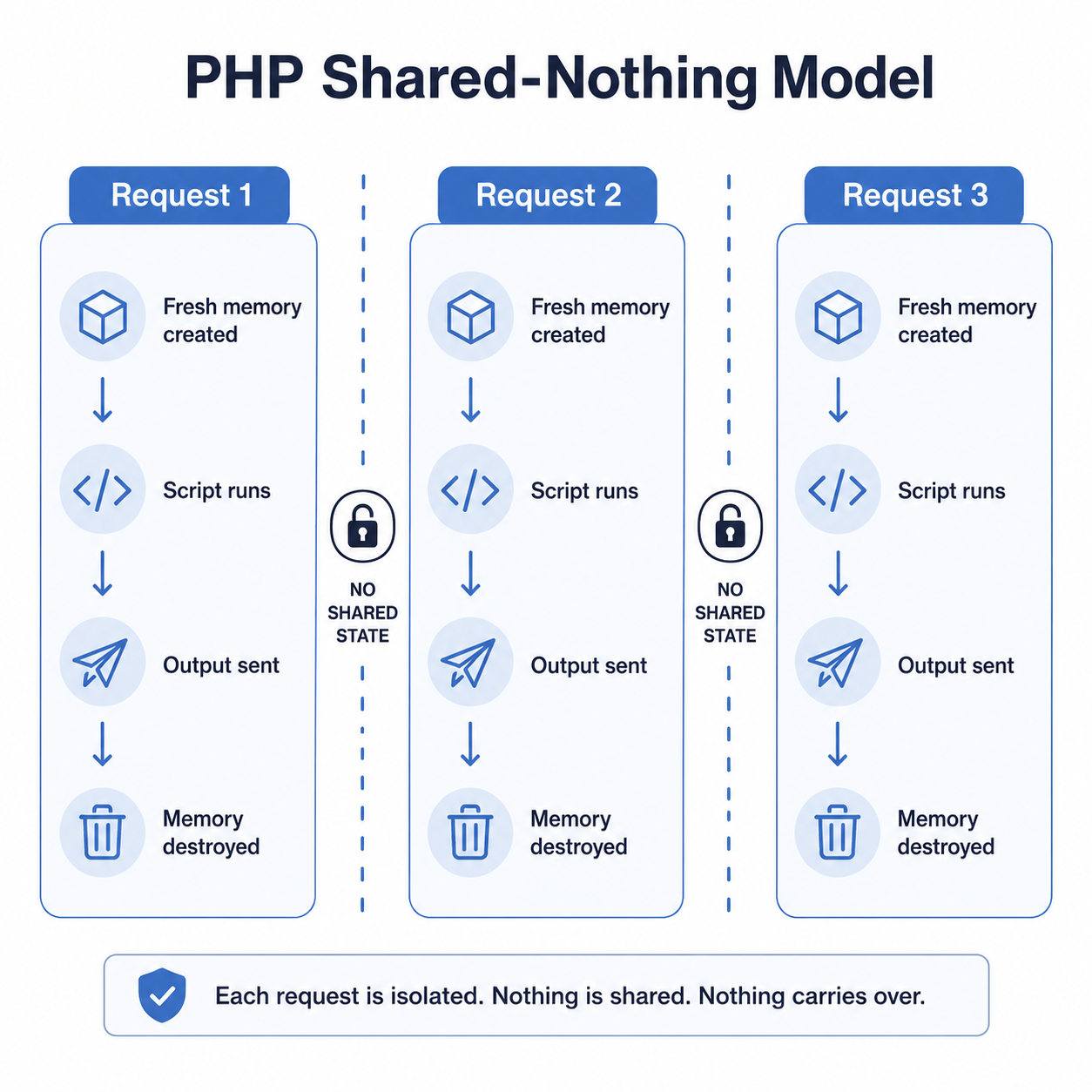
PHP was built around a simple promise: every request starts with a clean slate. When a request arrives, PHP sets up fresh memory, runs your script, sends the output, and then throws all of that memory away.
Nothing from one request leaks into the next. No leftover variables, no half-open state, no surprises. This is called the shared-nothing model, and it is the reason PHP is so forgiving for beginners.
The trade-off is that PHP does not keep your application "warm" in memory the way a long-running Node.js or Java server does. Each request rebuilds the world. That sounds wasteful, but as we will see, PHP-FPM and OPcache make it fast anyway.
Two Ways PHP Runs
PHP code does not always run the same way. There are two main worlds, and they behave very differently.
The first is the command line (CLI). When you run php script.php in a terminal, PHP starts one process, runs your script from top to bottom, and exits. This is how queue workers, cron jobs, and migrations run. These processes can live for seconds or for days.
The second is the web world, where a web server like Nginx hands your request to PHP-FPM. Here PHP does not start a fresh process per request. Instead, a pool of processes is already running and waiting. One of them picks up your request, handles it, resets, and waits for the next one.
That second model is what powers most live PHP sites, so it deserves a closer look.
The Request Lifecycle Through PHP-FPM
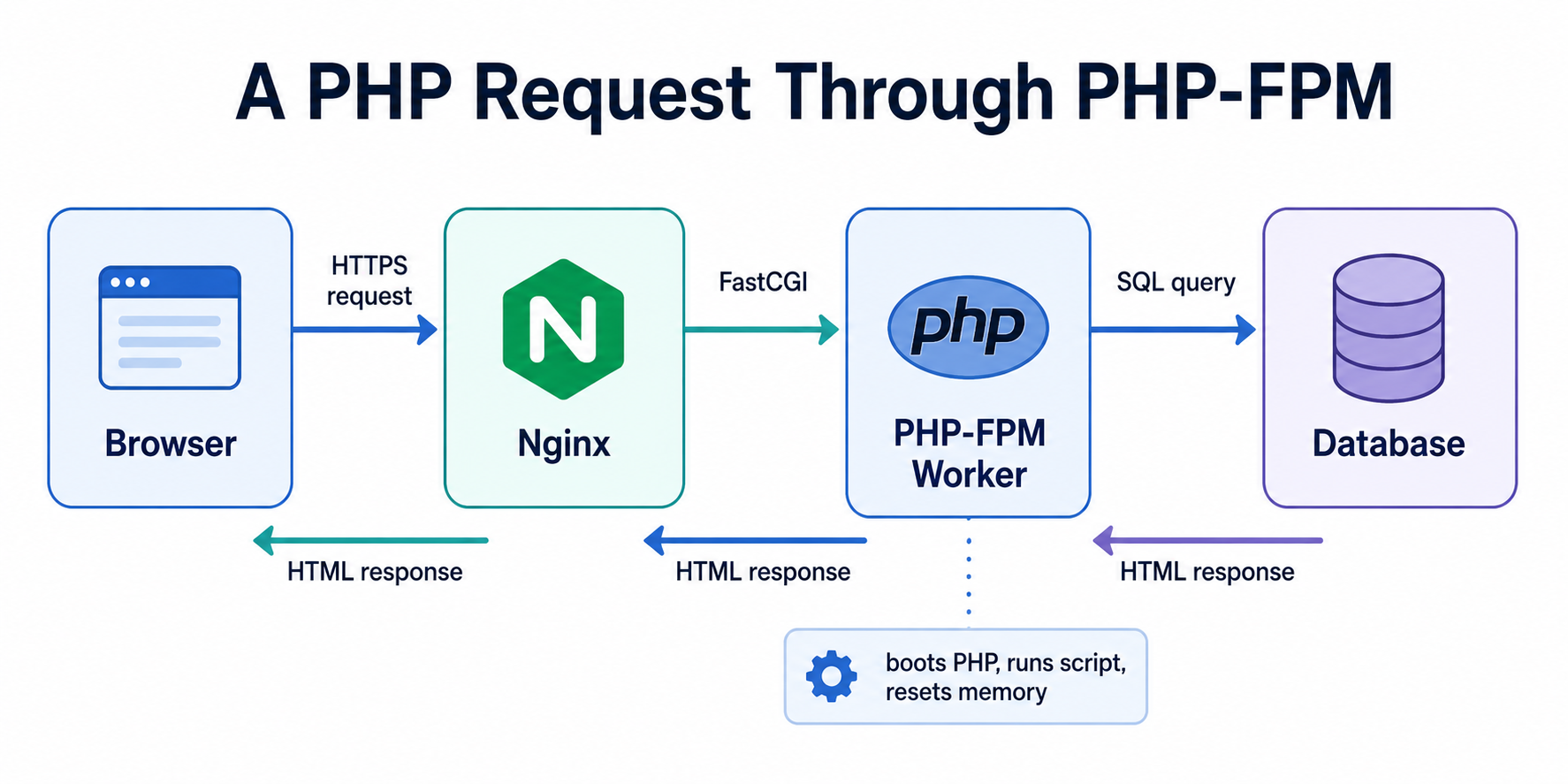
Let us follow a single web request. Imagine a user opens https://example.com/profile. Here is the chain of events.
[1] Browser sends an HTTP request to the server
[2] Nginx receives it on port 443 (HTTPS)
[3] Nginx sees a .php route and forwards it to PHP-FPM via FastCGI
[4] PHP-FPM master hands the request to a free worker process
[5] The worker boots PHP, loads your script, and runs it
[6] Your code queries the database, builds the HTML
[7] The worker returns the response to Nginx
[8] Nginx sends the final response back to the browser
[9] The worker resets its memory and waits for the next request
A few things are worth pulling out of that list.
Nginx does not run PHP itself. It speaks a protocol called FastCGI to pass the request over to PHP-FPM. Think of Nginx as the front desk and PHP-FPM as the back office that actually does the PHP work.
The worker in step 5 is a real operating system process. It already has PHP loaded in memory, so it does not pay the cost of starting the PHP engine from scratch. It just needs to run your specific script.
Step 9 is the shared-nothing model in action. After the response is sent, the worker wipes the request memory clean so the next visitor gets a fresh start.
PHP-FPM: A Pool of Worker Processes
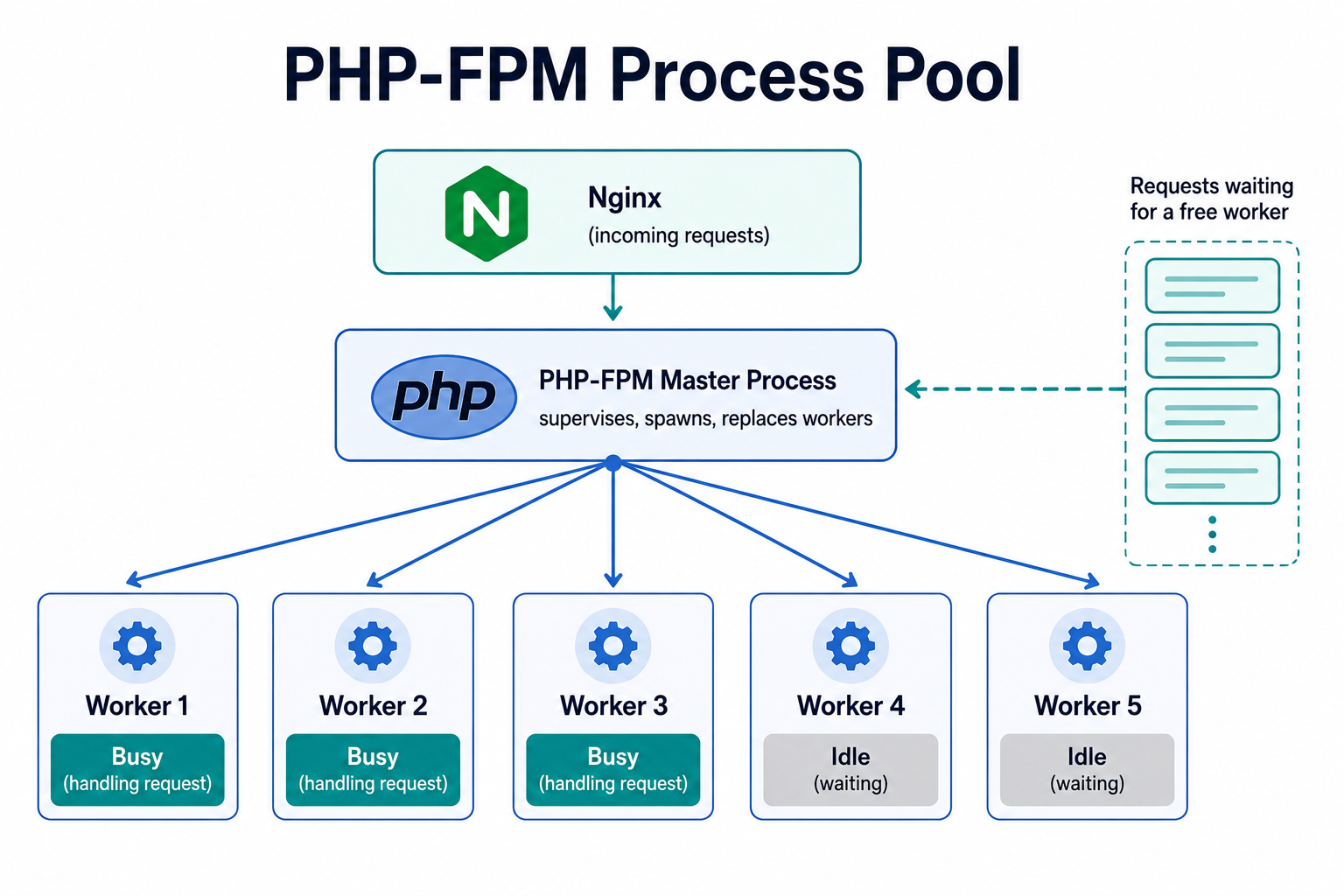
PHP-FPM stands for FastCGI Process Manager. The key word is manager. Its job is to keep a group of PHP worker processes alive and hand incoming requests to whichever worker is free.
When PHP-FPM starts, it launches one master process. The master does not handle requests itself. It watches the workers, starts new ones when needed, and replaces any that crash or grow too old.
The master then spawns several worker processes, also called children. Each worker can handle exactly one request at a time. If you have ten workers, your site can process ten PHP requests at the same moment. The eleventh request waits in a queue until a worker frees up.
This is the heart of PHP concurrency. PHP does not use threads inside one process to handle many users. It uses many separate processes, each doing one request. Separate processes mean a crash in one worker cannot corrupt another. That isolation is a big part of why PHP feels so stable.
A helpful way to picture it is a call center. The master process is the supervisor, and each worker is an agent on a phone. The number of agents sets how many callers you can help at once. When every agent is busy, new callers wait on hold until one is free.
How Many Workers? The Process Manager Modes
You control the worker pool through PHP-FPM's pm setting in the pool config file (often www.conf). There are three modes, and picking the right one matters for both speed and memory.
; static: a fixed number of workers, always running
pm = static
pm.max_children = 20

; dynamic: scales workers up and down with traffic
pm = dynamic
pm.max_children = 20
pm.start_servers = 4
pm.min_spare_servers = 2
pm.max_spare_servers = 8

; ondemand: no idle workers, spawned only when needed
pm = ondemand
pm.max_children = 20
pm.process_idle_timeout = 10s
Static keeps a fixed number of workers running at all times. It is the fastest under steady load because no time is spent spawning workers, but it uses that memory even when the site is quiet.
Dynamic keeps a small base of workers and adds more during busy periods, then trims them back when things calm down. It is a sensible default for most apps because it balances speed and memory.
Ondemand starts with zero workers and spawns one only when a request arrives. It saves the most memory, which is great for low-traffic sites or many small apps on one server, but the first request after a quiet spell pays a small startup cost.
The single most important number here is pm.max_children. It sets the hard ceiling on how many requests your site can handle at once. Set it too low and visitors wait in line. Set it too high and you risk running out of memory.
Sizing the Pool Without Guessing
A common mistake is setting pm.max_children to a big round number and hoping. The safer way is simple math based on memory.
First, find how much memory one worker uses. On a typical app it might be 40 to 80 MB. Then divide the memory you can spare for PHP by that number.
pm.max_children = (RAM available for PHP) / (average worker memory)

Example:
  Server RAM            = 4096 MB
  Reserved for OS, DB   = 1500 MB
  Available for PHP     = 2560 MB
  Average worker size   = 64 MB

  max_children = 2560 / 64 = 40 workers
This keeps you from the worst failure mode, where too many workers exhaust memory, the system starts swapping to disk, and every request crawls. It is better to queue a few requests than to let the whole server thrash.
Once you have a ceiling, watch your real traffic. If workers are almost always busy and requests are waiting, you may need more RAM or leaner code, not just a higher number.
OPcache: Why PHP Is Not as Slow as It Sounds
By now you might wonder: if PHP rebuilds everything each request, is it not doing a huge amount of repeated work? The answer is yes, and OPcache is how PHP avoids most of it.
Normally PHP reads your source files, compiles them into low-level instructions called opcodes, and then runs those opcodes. The compile step happens every single request, which is pure waste because your code rarely changes between requests.
OPcache fixes this by storing the compiled opcodes in shared memory. After the first request compiles a file, every later request skips straight to running it. The result is often a large speedup for free, just by turning it on.
; a sensible OPcache starting point in php.ini
opcache.enable = 1
opcache.memory_consumption = 256
opcache.max_accelerated_files = 20000
opcache.validate_timestamps = 1
In production, many teams set opcache.validate_timestamps = 0 so PHP does not even check whether files changed. That squeezes out a little more speed, with one catch: you must clear OPcache on every deploy, or your new code will not take effect.
OPcache is the quiet partner of the shared-nothing model. The request memory still gets thrown away each time, but the compiled code stays warm and shared across all workers.
Putting It All Together
Let us trace the full picture one more time, now that every piece has a name.
A request reaches Nginx, which forwards it over FastCGI to the PHP-FPM master. The master hands it to a free worker process from the pool. That worker already has PHP loaded and the compiled code waiting in OPcache, so it runs your script quickly, talks to the database, and returns HTML. Then it wipes its request memory and waits for the next visitor.
The shared-nothing model gives you safety and simplicity. The worker pool gives you concurrency. OPcache gives you speed. Together they explain why PHP can stay both beginner-friendly and genuinely fast at scale.
Key Takeaways
- PHP follows a shared-nothing model: each request gets fresh memory that is destroyed when the request ends.
- CLI runs one script and exits, while PHP-FPM keeps a pool of worker processes ready for web requests.
- Nginx does not run PHP. It passes requests to PHP-FPM over FastCGI.
- The master process supervises the pool, and each worker handles one request at a time, so worker count equals your real concurrency.
- Choose the
pmmode (static, dynamic, ondemand) to fit your traffic, and sizepm.max_childrenfrom available memory, not guesswork. - OPcache keeps compiled code warm across requests and workers, which is why rebuilding the world each request is still fast.
In the next post, we will leave the request cycle behind and look at long-running PHP: queue workers, daemons, and how to shut them down gracefully without losing work.